The foundation workshop / 24 weeks · 12 chapters
A place for
careful making.
Read, build, inspect, change one thing. Twelve two-week chapters take you from a first image to a small rendering project you can explain.
Working in a later course? Choose its companion guide or prepare your AMD Linux and Apple silicon workspaces.
A small, explicit toolchain.
The native references use C++23, CMake, and the standard library. Scenes are ordinary typed C++ values. There is no JSON parser, third-party header dependency, graphics SDK, or network service in the native starter.
Use a compiler and standard library that support C++23, including std::expected, and CMake 3.25 or later. The reference is verified with Apple Clang 21 on macOS; Linux is an intended target that has not been verified here.
A fifteen-page primer starts from an empty folder, then teaches libraries, target requirements, tests, failure diagnosis, presets, and sanitizers using your own project and this renderer. Your existing C++ experience is welcome; no remembered CMake knowledge is assumed.
The learning website runs with Bun 1.4.4. The three native programs run as C++ executables on your machine. Browser controls teach the ideas; they don't compile or launch your C++.
Make an image. Then make a change.
From the project's native directory, configure, build, and run its checks:
cmake --preset clang-debug
cmake --build --preset clang-debug --parallel
ctest --preset clang-debug
./build/clang-debug/prism-render studio.ppm
./build/clang-debug/prism-raster triangles.ppm
./build/clang-debug/prism-memory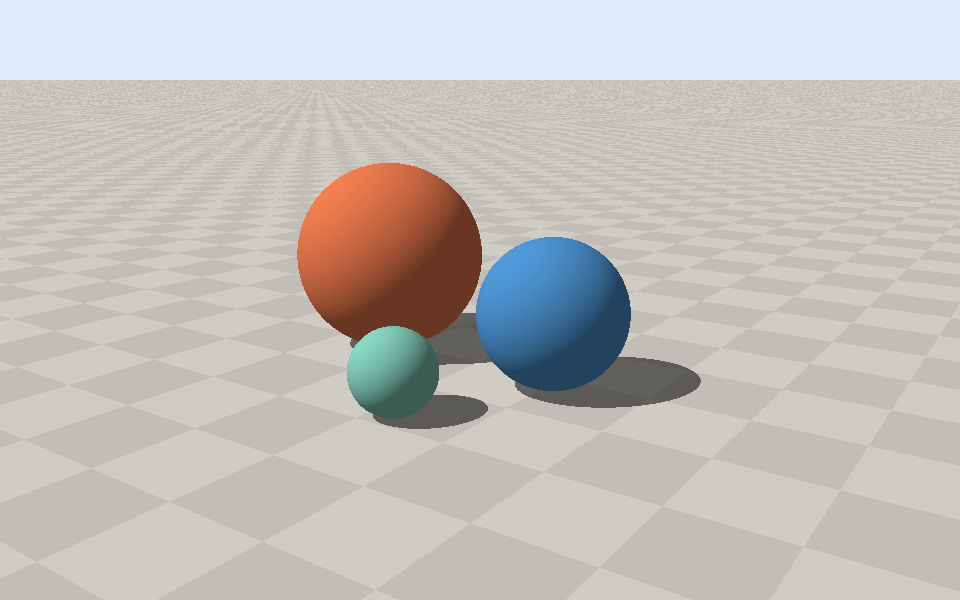
demo_scene() reproduces this image; its PPM was converted to PNG for this page.- Render a world
prism-renderuses the typeddemo_scene()in scene.cpp. Change a sphere, camera, or light, rebuild, and compare the image.- Rasterize triangles
prism-rasterusesdemo_raster_scene()in raster_lab.cpp. It interpolates screen-space RGB and depth, skips degenerate triangles, and bounds its pixel traversal.- Observe a memory budget
prism-memoryruns the separate PMR experiment: a bounded arena, controlled allocation failure, cleanup, and promotion to an independent owner.
Both image programs write binary P6 PPM. Inspect the dimensions and header, then open the file in a compatible viewer. Replacing the provided scene unchanged is not the chapter mission: make a deliberate change and record what it taught you.
Open the complete native instructions ↗Run these commands on your machine. This page never starts a compiler or accesses work infrastructure.
One chapter. Two weeks.
One finished experiment.
Use the first week to understand and reproduce a small result. Use the second to make your own variation, add evidence, and explain a decision. The schedule is a suggested pace, with a small restart step in each chapter.
- Weeks 1–2First light
- Weeks 3–4Own the frame
- Weeks 5–6Vectors, then rays
- Weeks 7–8A scene by design
- Weeks 9–10Trace your first world
- Weeks 11–12Memory with a budget
- Weeks 13–14Shadows and second rays
- Weeks 15–16Triangles on a grid
- Weeks 17–18Camera, clipping, depth
- Weeks 19–20Attributes that stay attached
- Weeks 21–22Your first shader
- Weeks 23–24A renderer you can defend
Each chapter includes a concrete mission, a definition of done, a remix, review questions, and optional further reading. Your notes and checks are stored in this browser; they are personal records, not automatic grading.
Open your course journey ↗Find your next file.
Choose your project, follow a starting point, or look up a file. Each companion includes the source you can read, build, and make your own.
Your source shelf
9 companions · 79 filesRead online or download a file. The project guide shows how to build and run it.
Use the guidelines.
Understand the reason.
Your downloaded C++ Core Guidelines are included as a reference snapshot. The assignments are original course material; linked reading from Computer Graphics from Scratch and LearnOpenGL is credited beside the chapters it supports.
- Ownership before optimization
- Start with values,
std::vector, and scoped resources. Name the owner and its lifetime before adding a view, custom allocator, or concurrency. R.1 · C.20 - Validate typed values too
- Typed scenes still need finite coordinates, supported dimensions, positive radii, and bounded combined work. Check factors before multiplying and validate before allocating or indexing pixels.
- Make failures observable
- Test a known pixel, a rejected boundary, and a failed output. Sanitizers and focused tests provide evidence; they do not prove complete memory safety.
- Measure allocation
- Use ordinary containers first. Then observe requests through a bounded
std::pmrarena. Its resource must outlive every borrowing container, and all borrowers must die before reset. - State the implemented boundary
- The native examples implement ray/sphere and ground hits, shadows, screen-space triangle coverage, interpolated RGB/depth, PPM output, and a PMR experiment. Reflections, 3D raster projection/clipping, textures, and perspective-correct UVs are your guided extensions.
- Make the result yours
- Keep attribution for supplied sources and reading. Show your own change, regression test, image, and reasoning. An unchanged reference is a study aid; it is not your independent portfolio project.
First Light teaches bounded, inspectable CPU programs. Later course companions add an OpenGL camera, a diffuse path renderer, a responsive image pipeline, PMR rendering experiments, Asio coroutines, and Vulkan/Metal clear-color windows. Each companion states its tested behavior and the project features you will build.
Build the next contract
when you can explain this one.
The browser shader chapter connects the CPU experiments to WebGL2 / GLSL ES 3.00. Continue inside Parallax with The Shader Workshop: original OpenGL lessons, a native C++ starter, and Chromatic Observatory, your interactive exhibit.
Light Transport develops a CPU path tracer. Renderer Engineering teaches task ownership, bounded queues, cancellation, joining, asset generations, and the difference between coroutine syntax and an execution runtime.
Vulkan and Metal then make GPU submission, completion, and resource retirement concrete on your two machines. Try the frame-lifetime experiment before translating it into API calls. First, finish your current small project with a reproducible image, useful tests, and a debugging story you can explain.